Multiple locations
A merchant with more than one business location can give each location its own payment account and its own payouts. The merchant adds all its locations in the Locations step of the onboarding form, also the locations of a 100% subsidiary. It does not onboard each location or subsidiary again. After the company is verified, the merchant can add more locations.
When the merchant adds locations
| When | Where |
|---|---|
| During the onboarding | The Locations step of the onboarding form. |
After the company is verified | The /locations link, or Add locations in the update menu. |
The same rules apply in both cases.
Which locations you can add
A location must belong to the company itself, or to a subsidiary that the company owns for 100% in the same country. Every other company is onboarded as a new company.
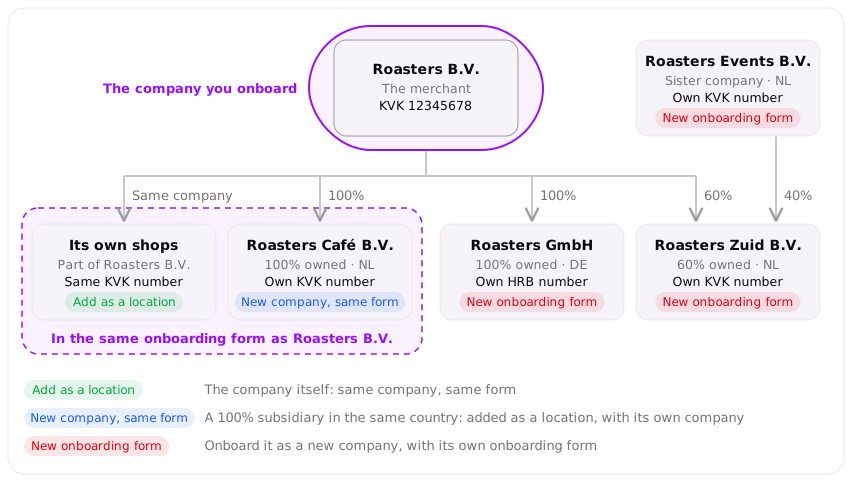
In this example, Roasters B.V. is the merchant. Each company shows if you add it as a location of Roasters B.V., or if it needs a new onboarding form.
| The location belongs to | Can you add it to Roasters B.V.? | Why |
|---|---|---|
| Roasters B.V. itself, with the same KVK number | Yes | It is the same legal entity. |
| Roasters Café B.V., with its own KVK number, 100% owned, registered in NL | Yes, as a subsidiary | Rootline creates a new company for it, from the same form. A person with the authority to sign for it accepts the agreements. |
| Roasters Zuid B.V., with its own KVK number, 60% owned, the other 40% owned by Roasters Events B.V. | No | It is not owned for 100%. Onboard it as a new company. |
| Roasters GmbH, with its own HRB number, 100% owned, registered in DE | No | It is registered in another country. Onboard it as a new company. |
| Roasters Events B.V., with its own KVK number, a sister company with the same owners | No | Roasters B.V. does not own it. Onboard it as a new company. |
A location of the company itself
The location has the same registration number as the company.
- Rootline does its checks on the location and sets up its payment account.
- Nobody signs for the location: the company accepts the agreements once.
- After the company is
verified, anybody with the/locationslink can add these locations, also you as the partner.next_actiondoes not change.
A location of a 100% subsidiary
The subsidiary is a separate legal entity with its own registration number.
What the merchant does:
- Finds the subsidiary by its name, or enters its registration number. Rootline fills in the legal name and the registered address from the business register. The registered address becomes the address of the location, and the merchant can change it.
- Confirms that the company owns the subsidiary for 100%.
- Gives the IBAN and the VAT number of the subsidiary.
- Signs for the subsidiary. See Who signs for a subsidiary.
What Rootline does:
- Creates a new company for the subsidiary, with its own
company_id, in your namespace. It starts withverification_status: openandnext_action: await_assessment. - Does the same onboarding checks as on any new company. The merchant does not fill in a new onboarding form: the checks use the details of the location.
- Sets up the account after its review. The new accounts show on the company when they are ready.
When a verified company adds a subsidiary, next_action of that company becomes await_assessment until Rootline finishes the review.
Who signs for a subsidiary
Only a person with the authority to sign for the subsidiary can accept the agreements for it. Both declarations, the Merchant Agreement and the signing authority with the Terms of Service, list every company that the person signs for: first the company, then each subsidiary.
During the onboarding, the person who signs the onboarding form signs for each subsidiary too. That person uploaded an ID document earlier in the form. The welcome email lists the company and each subsidiary.
After the company is verified, the form ends with the step Sign for the subsidiaries. In this step, the person who signs:
- Uploads an ID document. Rootline reads the name, the date of birth, the country of birth and the country of residence from it. The person can correct these details.
- Gives an email address.
- Accepts the Merchant Agreement and declares the authority to sign, with the Terms of Service.
Rootline screens the person who signs, unless that person was already screened as an owner or as the signer of the company. Rootline sends one welcome email to the signer. The email lists the subsidiaries and has the Merchant Agreement attached.
Example video
The video shows the form of the /locations link. The merchant adds one location with the same registration number at the company address, and one location of a 100% subsidiary. The merchant finds the subsidiary by its name, and Rootline fills in its details and its registered address from the business register. Because the form has a subsidiary, it ends with the step Sign for the subsidiaries. There, the ID document fills in the details of the person who signs, and both declarations list the company and the subsidiary.